A mouse that double-clicks when you press once is the most common mechanical failure in input devices, and it makes itself felt everywhere: files open when you meant to select them, weapons fire in pairs, drag-and-drop drops at the wrong moment. The cause is almost always switch bounce - the tiny metal leaf inside the button fatigues or collects oxidation and closes the contact twice per press. Confirm it in ten seconds with the double click test, then work down this list.
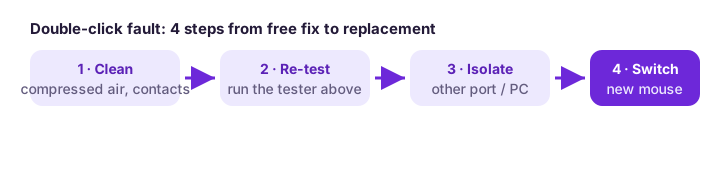
Step 1 - rule out the free causes first
Software can fake the symptom. A flaky driver after a Windows update, a vendor utility with an aggressive double-click speed setting, or a game profile with a macro bound to the button all produce doubled clicks that no amount of cleaning will fix. Unplug any vendor software, reset the OS double-click speed to default, try another USB port, and if you can, test the mouse on a second computer. If the doubling follows the mouse to the other machine, it is hardware - continue below.
Step 2 - clean the switch
Roughly half of early-stage cases respond to cleaning. Unplug the mouse, then blow compressed air into the seams around the affected button while clicking it rapidly - the goal is to dislodge dust and oxidized debris from the contact area. For stubborn cases, one drop of electronic contact cleaner worked into the switch (click it twenty times to distribute, then let it dry for ten minutes) revives marginal contacts. Do not use water, alcohol-soaked paper or WD-40: the first two leave residue, the last gums the mechanism.
Step 3 - re-test and decide
Run the double click test again: ten slow, single clicks per second. Zero flagged doubles after cleaning means the switch recovered - re-check monthly, because cleaned contacts tend to degrade again. Persistent doubles mean the leaf is fatigued, and cleaning will not un-fatigue metal. Your options from here: replace the switch (practical on hot-swappable or soldered gaming mice if you own a soldering iron - switches cost cents), claim warranty (double-clicking is a recognized defect for most gaming brands), or replace the mouse.
Step 4 - if you replace, buy against this failure mode
Switches differ in rated life and in how they fail. Omron’s classic D2F series and Kailh GM 8.0 are known for longevity; optical switches (found on several gaming lines) replace the metal contact with a light beam and cannot bounce - if double-clicking has burned you twice, an optical-switch mouse ends the cycle. Our buying checklist walks through the rest of the decision so the replacement lasts.
Prevention
You cannot stop metal fatigue, but you can slow it: keep crumbs and hair out of the mouse (a case or a quick air-blast monthly), avoid slamming buttons, and run the double-click test occasionally so you catch degradation early - replacing a mouse on your schedule beats replacing it mid-tournament.
Frequently asked questions
Why does my mouse only double-click sometimes?
Bounce worsens with heat, humidity and wear. A marginal switch passes a cold morning test and fails mid-session - which is why the fix guide says re-test after gaming, not just before it.
Can I fix double-clicking without opening the mouse?
Often yes: compressed air plus contact cleaner through the button seams fixes early oxidation. Fatigued metal inside the switch needs the mouse opened and the switch replaced.
Is double-clicking covered by warranty?
Usually yes for gaming brands - it is a well-known failure mode and most manufacturers replace affected mice inside the warranty period. A screenshot of the double click test showing flagged doubles supports the claim.
Do optical mice ever double-click?
Effectively no - the switching is a light beam, not a metal contact, so there is nothing to bounce. Electronics elsewhere can still fail, but the classic bounce symptom disappears.
Related: run the double click test · choosing a replacement · when clicks feel delayed instead · the full mouse test.