Clicks per second is a skill with a hard physical ceiling - and most players leave 2-3 CPS on the table between no warm-up, bad technique and a switch that drops presses. Baseline first: run the CPS test three times on the 5-second timer and take the median. That number is your honest starting point, because a single run swings wildly.
The technique ladder
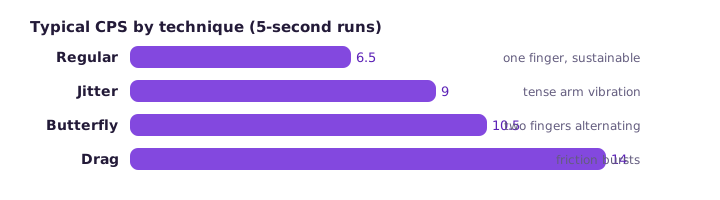
Regular clicking (one finger) tops out around 6-7 CPS. The first real jump comes from butterfly clicking: two fingers (usually index and middle) alternate on the same button, so one finger rests while the other presses. Most people reach 8-12 within a week of practice - it is the standard scoreboard technique because it is fast, sustainable and controllable.
Drag clicking drags a finger across the button so friction fires the switch multiple times per stroke. It produces the biggest numbers on textured buttons and near-zero on smooth ones, and it hammers the switch surface. Jitter clicking tenses the forearm to vibrate the finger onto the button - quick gains, but tiring and inconsistent. Learn butterfly first; it transfers to everything.
A ten-minute warm-up that works
Two minutes of relaxed regular clicking at 70% effort, two minutes of slow butterfly focusing on even rhythm rather than speed, two minutes of full-speed butterfly on the 1-second timer (bursts teach your fingers the peak), then four minutes of 5-second runs at full effort with a minute of rest between. Scores improve fastest when rest is part of the plan - tired fingers click slower, full stop.
The hardware factor nobody prices in
Every dropped press is a zero in your average, and switches drop presses as they wear. If your median score dropped over weeks of no change in technique, run the double click test: flagged doubles mean a fatigued switch that is also missing presses. Light actuation-force switches (45g and below) fatigue faster under butterfly clicking than heavier ones - a reason competitive players replace mice yearly.
What does not work: software autoclickers (banned wherever scores matter, and detectable by variance analysis), and mashing harder (tension slows the finger). The ceiling is real - a human at 12+ CPS is already at the edge of what a mechanical switch registers reliably. Chase consistency first: a stable 9 beats a lucky 12.
Frequently asked questions
What is the average CPS for a normal player?
Four to six clicks per second on the 5-second timer. Anything above 8 usually means butterfly or drag technique rather than raw finger speed.
Does CPS matter outside Minecraft?
It matters wherever click rate is an input: osu! streams, idle clickers, some roblox games. In shooters and MOBAs, aim and decision speed dominate - CPS is a warm-up metric there.
Is drag clicking bad for the mouse?
Yes - the friction wears both the switch surface and the button texture. Dedicated drag mice accept this as consumable cost; an office mouse will not survive months of it.
Why is my CPS inconsistent between days?
Warm-up, sleep and grip tension dominate day-to-day variance. Take the median of three runs each session and compare medians across weeks - single runs are noise.
Related: run the CPS test · thumb speed variant · check for a worn switch · when clicks drop for other reasons.