Mouse Tester - Test Every Button, Click and Scroll Online
A dead side button or a switch that double-fires ruins games and work alike. Move your mouse over the diagram below: every button and scroll direction you hit lights up and counts - and anything your mouse fails to send is a hardware fault you can prove in ten seconds.
Button-by-button mouse test
Click every button and scroll the wheel - each part lights up and counts. A gap under 500 ms on the same button counts as a double click and is flagged in orange.
Buttons hit: 0 · Doubles flagged: 0
Tip: right-click is part of the test - the page blocks the context menu only inside the mouse diagram.
How to test your mouse in 30 seconds
- Press every button once. Left, right, middle, both side buttons - each lights up a region of the diagram and adds a count. A button you press without a light-up is dead or intermittent.
- Scroll up and down over the pad. The wheel zones count notches; a wheel that skips or runs the wrong way shows up immediately.
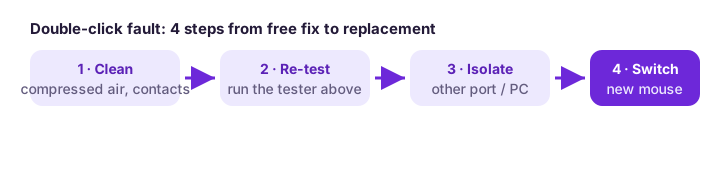
- Click slowly ten times. If doubles get flagged while you are clicking single times, your switch is worn - the fix guide below starts with a free cleaning attempt before you replace anything.
What each test is for
CPS test
Clicks per second with six timer lengths and a rating table
Double click test
Millisecond gaps between clicks - catches switches that double-fire
Keyboard tester
Every key lights up; hold keys together to check rollover
DPI checker
Move the mouse a known distance, read the sensor count
Spacebar counter
Timed spacebar hits for warming up or challenges
Why mice fail - the short version
Mechanical switches are rated for tens of millions of presses, but the contacts inside oxidize and the metal leaf fatigues long before that on the most-used button. The classic symptoms in order of appearance: occasional double clicks on single presses, clicks that register a few milliseconds late, and finally a dead button. Dust and moisture accelerate all three. Scroll wheels fail differently - the rotary encoder collects debris and starts skipping steps, which feels like the page jumping around while you scroll.
Software causes are worth ruling out first because they cost nothing to fix: a stuck driver after an update, a game profile with remapped buttons, or an aggressive power-saving USB setting that drops the device. Our double-clicking fix guide and lag fix guide walk through both hardware and software paths in the order that finds the fault fastest.
Frequently asked questions
What does a mouse tester do?
It exercises every input your mouse sends - left, middle and right buttons, side buttons, scroll up and down - and shows what the computer actually received. If a click you made never lights up here, the problem is in the mouse or its connection, not in the game or app you are using.
How do I test if my mouse is double-clicking?
Open the double click test and click slowly and deliberately, once per second. A worn switch fires a second contact a few milliseconds after the first - the tool prints every gap under 500 ms and counts it as a double. Several doubles in ten single clicks mean the switch needs cleaning or replacing.
What is a good CPS score?
Four to six clicks per second is a normal range for regular players; six to eight is fast; above eight usually means dedicated techniques like butterfly or drag clicking. The full rating table sits under the CPS test.
Is any of this data sent anywhere?
No. Every tool runs in your browser using standard events - there is no upload, no account and no storage beyond your own best scores kept in your browser.
Does it work on a trackpad or touch screen?
Buttons and double-click detection work on a trackpad. The DPI checker needs a real mouse, and the keyboard test needs a physical keyboard - touch screens cannot report the underlying hardware events.